New Project Startup Process

This document represents the project start-up process that needs to be performed prior to or very soon after project kickoff. This process is to be executed by the BLT operations staff with editing permissions to create objects in the systems being used.
During a project's start-up, a lot of operations components must be created to accompany and facilitate the execution of the project, e.g., assets, system records, reports, etc.
The primary objective of this document is to:
- To ensure systems as well as objects in those systems exist and are properly configured to support the needs of the project and the company.
Starting a New Project
STEP 1 Go to the Project Numbers spreadsheet, add a new row below, and fill in the information about the new project.
STEP 2 Create a new project in Asana under the client. Use the project number from the spreadsheet and the name of the project as the title. For example: 250P - ISTE Salesforce Support Retainer.
STEP 3 If the project is billable, set it to billable in Asana. Choose the appropriate Client, Billing, and Budget.
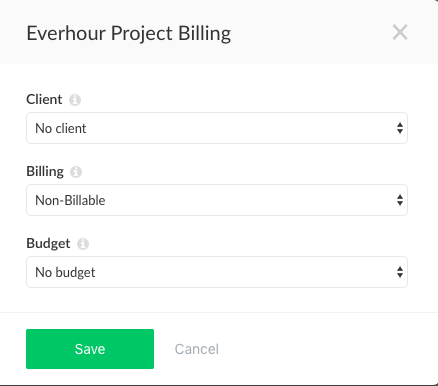
STEP 4 After that, go to the Active Projects Datasheet and create Google Site(s) for the new project by copying the previous one set for this client.
STEP 5 After the project was set to the billable attribute and the budget was established, go to Everhour. There, create a set of Reports required to keep track of the budget and hours spent on the project.
STEP 6 Create a new project in QB.
STEP 7 Create a Slack channel for the new project if needed.
- Use these guidelines to figure out if needed and how to name it.
STEP 8 If the project is categorized as fixed bid incremental billing, create invoices for the project in Everhour using this process, and add the Issue date for when each of them should be sent. They will be saved in the Invoices tab in Everhour and should be sent on the assigned Issue date.